USB hub: Difference between revisions
CSV import |
CSV import |
||
| Line 51: | Line 51: | ||
[[Category:USB]] | [[Category:USB]] | ||
[[Category:Computer peripherals]] | [[Category:Computer peripherals]] | ||
<gallery> | |||
File:USB_hub.jpg|USB hub | |||
File:Hub-ports.jpeg|Hub ports | |||
File:USB_Hub_Internals.jpg|USB Hub Internals | |||
File:ALMIGHTY_DOCK_C1.jpg|ALMIGHTY DOCK C1 | |||
File:P059724-57813.jpg|USB hub | |||
File:Powered_USB_hub_with_7_ports.jpg|Powered USB hub with 7 ports | |||
File:4port-usb-hub-bus-powered.jpg|4-port USB hub bus powered | |||
File:VIA_VL810_SuperSpeed_Hub_Demo_Board.jpg|VIA VL810 SuperSpeed Hub Demo Board | |||
</gallery> | |||
Latest revision as of 11:16, 18 February 2025
USB Hub[edit]
A USB hub is a device that expands a single USB port into several so that there are more ports available to connect devices to a host system. USB hubs are often built into equipment such as computers, keyboards, monitors, or printers. When such a device has many USB ports, they are usually all connected to a single hub, internally.
Functionality[edit]
USB hubs can be powered or unpowered. A powered hub draws power from an external power supply and can provide power to connected devices, while an unpowered hub draws power from the host computer's USB port. Powered hubs are useful for devices that require more power than the host can provide, such as external hard drives.
Types[edit]
Bus-powered hubs[edit]
Bus-powered hubs draw all their power from the host computer's USB interface. They are limited in the amount of power they can provide to connected devices, which can be a disadvantage when connecting power-hungry devices.
Self-powered hubs[edit]
Self-powered hubs have their own power supply and can provide full power to each port. This makes them suitable for devices that require more power, such as external hard drives or other peripherals.
Internal Structure[edit]
Inside a USB hub, there is a controller that manages the data traffic between the host and the connected devices. The controller ensures that data is correctly routed to and from the appropriate devices.
USB Standards[edit]
USB hubs support various USB standards, including USB 1.1, USB 2.0, USB 3.0, and USB 3.1. Each standard offers different data transfer rates, with USB 3.0 and later providing significantly faster speeds than earlier versions.
Applications[edit]
USB hubs are commonly used to connect multiple peripherals to a single computer, such as mice, keyboards, printers, and external hard drives. They are also used in networking to connect multiple devices to a single network port.
Related Pages[edit]
References[edit]
- "USB Hub." Wikipedia, The Free Encyclopedia. Wikipedia, The Free Encyclopedia, last visited October 2023.
-
 USB hub
 -
 Hub ports
 -
 USB Hub Internals
 -
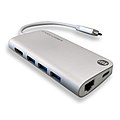 ALMIGHTY DOCK C1
 -
 USB hub
 -
 Powered USB hub with 7 ports
 -
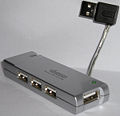 4-port USB hub bus powered
 -
 VIA VL810 SuperSpeed Hub Demo Board


